 Kindling
Clinic onboarding
Clinic onboarding with a shared checklist and clear owners
Start with a preset instead of a blank checklist. Give each step an owner and a due date, and show the clinic what it needs to do next.
Kindling AI for Agencies
How it works
Set up the clinic
Enter its people, practice details, agents and lines. Save the draft or hand it to a colleague before creating the clinic.
Run the onboarding project
Give steps owners and due dates. Use the plan and its history to see what’s blocked, what the clinic can see and what waits on staff.
Review readiness separately
The clinic’s approval and the operator’s readiness checks stay separate from the milestone checklist.
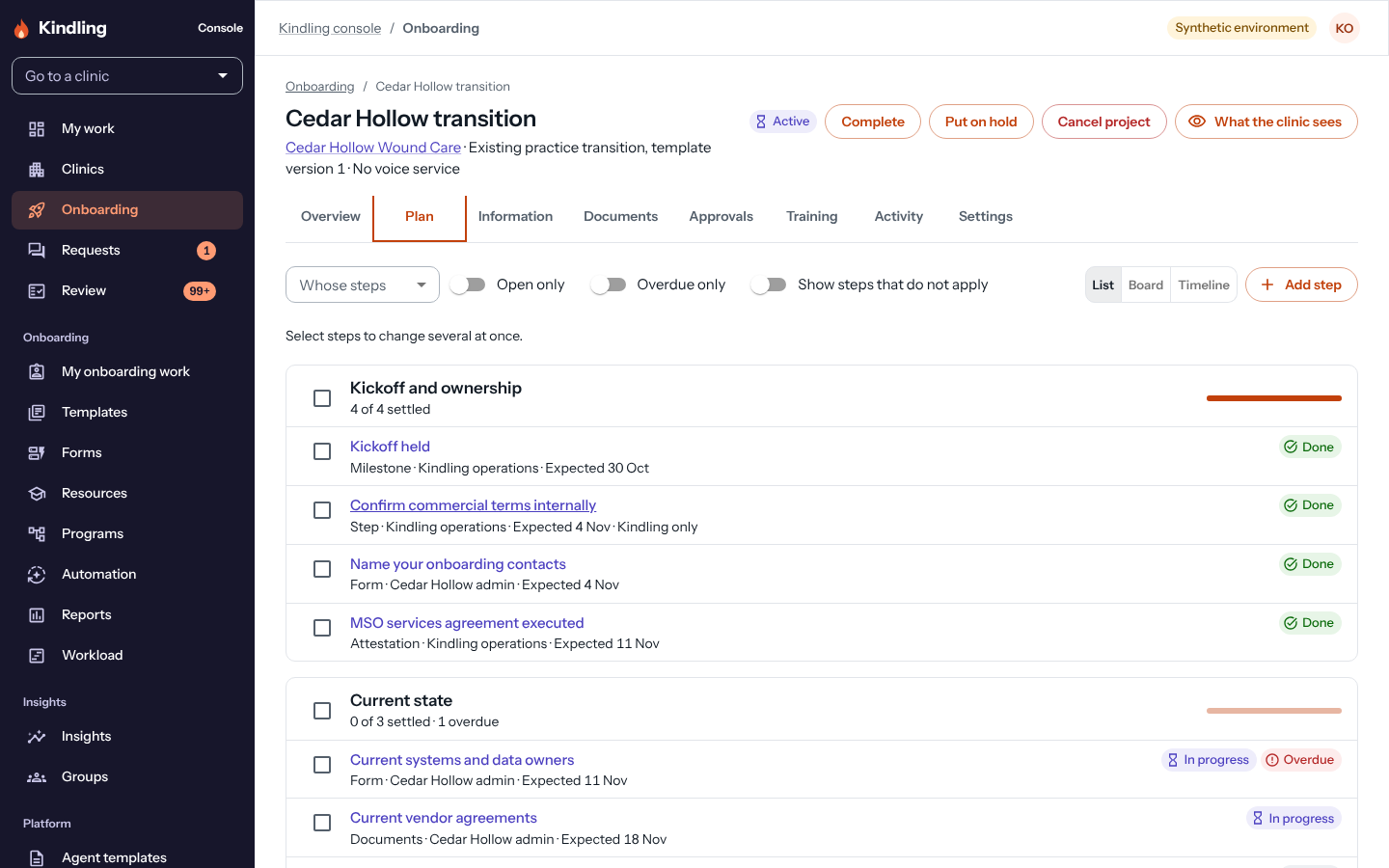
Sample walkthrough
A clinic is waiting on the final staff step
Made-up example. It won’t place a call or change any records.
Clinic owner
Reviews the shared information and caller messages.
Implementation lead
Checks line and agent setup and records any unresolved work.
Service review
The console distinguishes a finished project step from a go-live decision.
Kindling AI for Agencies
Ask for a product walkthrough
Bring one client and one workflow. We’ll walk through the agent setup, what a client can see, and where your team handles support.